SKU:NVR-104MH-C-4P
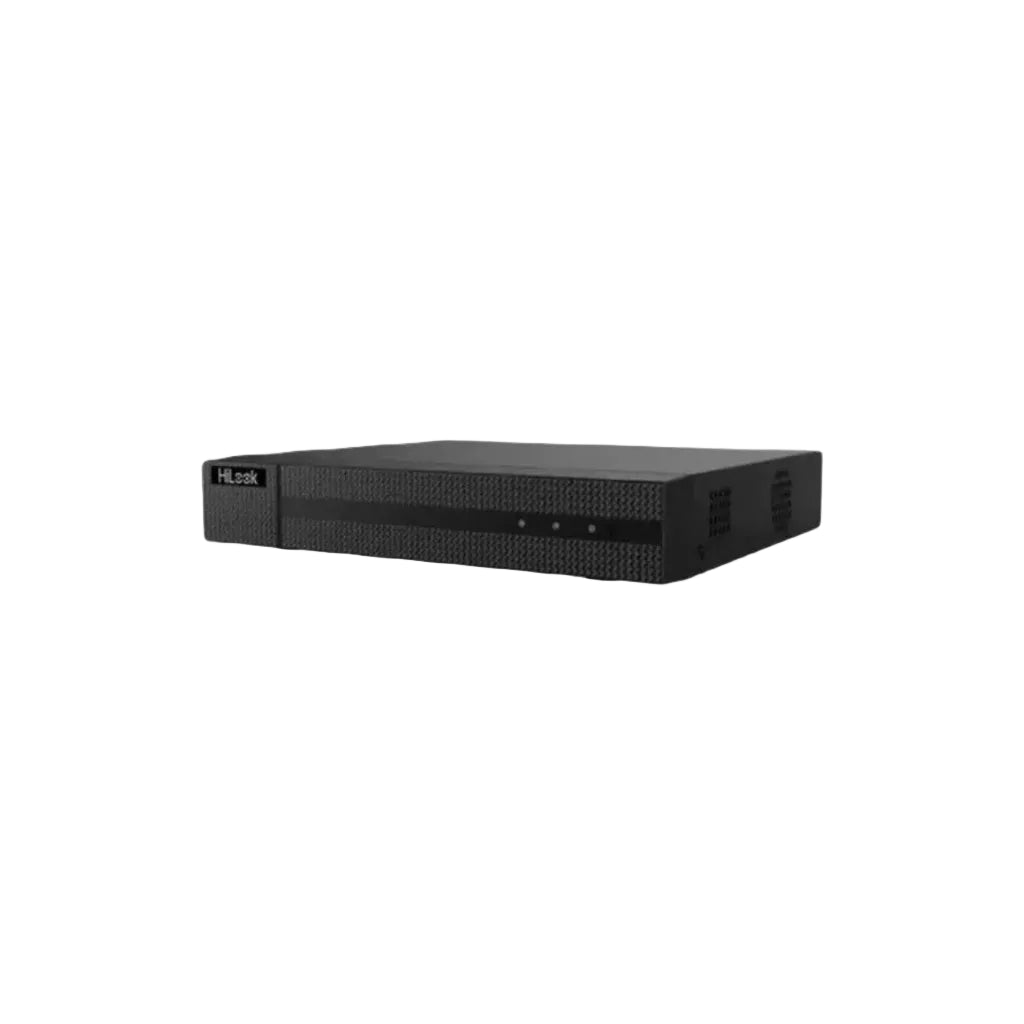
HiLook 4 Channel NVR-104MH-C/4P Mini 1U 4 PoE 4K NVR
Login to buy-
Vendor:
HiLook
- Tags: New arrival, Offers
Buying from us? You get more than just the product.
Free Pre-Programming
We can pre-configure eligible products so they're ready to install.
Free 45 Mins Onsite Support
Stuck on the job? We'll come to you. Eligible purchases include up to 45 minutes of onsite support.
Project Management
From plans to handover. We assist with design, equipment selection, programming and commissioning.
End-User Support
We help support your customers too. Give your customers the confidence with reliable local support.

- Description
- Specification
Product Overview
The recorder is the part of a CCTV system nobody thinks about until it matters. Cameras get the attention; the NVR quietly determines how far back your footage goes, how quickly you can find an incident, and whether the whole system stays up.
The HiLook NVR-104MH-C-4P is the sensible default for a four-camera wired system. Its main practical advantage is the four built-in PoE ports: cameras plug straight into the back of the recorder over a single Cat6 run each, carrying both data and power, with no separate PoE switch to buy, mount or configure. For a house or a small shop, that removes most of the complexity from the install.
It records at up to 8MP per channel with H.265+ compression, outputs 4K over HDMI with a simultaneous VGA feed for a second screen, takes a single SATA drive up to 6TB, and supports remote viewing on phone or tablet. It ships without a hard drive, so you choose the capacity that suits how long you need to keep footage.
Key Capabilities
Four Built-In PoE Ports
Each channel has its own RJ-45 PoE port supporting IEEE 802.3af/at, so cameras connect directly to the recorder with one cable each. No separate PoE switch to buy, power or find space for, and no manual IP addressing — HiLook cameras are detected automatically. On a small install this is the difference between a two-hour job and a half-day one.
Records at Up to 8MP
Accepts and records cameras from 720p through to 8MP, so the recorder is not the thing limiting your camera choice. You can start with 4MP cameras and upgrade to 6MP or 8MP later without replacing the NVR — worth knowing if you are building the system in stages.
4K HDMI With Simultaneous VGA
HDMI runs at 4K (3840 × 2160) at 30 Hz for a sharp live view on a modern monitor or TV, with VGA running at the same time up to 1080p. Two displays from one recorder, no splitter — useful when you want a permanent monitor at a counter and a second screen elsewhere.
H.265+ Compression
Supports H.265+, H.265, H.264+, H.264 and MPEG4, so it works with both current and older HiLook cameras. H.265+ is the one that matters for running costs — it compresses substantially harder than H.264, which directly translates into more weeks of footage on the same drive.
Single SATA Bay to 6 TB
One internal drive bay taking surveillance-rated drives up to 6 TB. On a four-camera system recording continuously at 1080p with H.265+, a 4 TB drive typically gives several weeks of rolling footage before it starts overwriting. The unit ships bare so you choose capacity to match your retention needs.
Four-Channel Synchronous Playback
All four cameras can be viewed live in a split-screen layout and played back simultaneously, so you can follow someone across multiple camera views on the same timeline rather than checking each channel one at a time. Single-channel full-screen view is available for closer review.
Remote Viewing on Phone and Tablet
Live view and playback from iOS or Android through the HiLook mobile app, with support for up to 16 simultaneous remote connections. DDNS and UPnP support simplifies the network side of remote access — usually the part that stalls a DIY setup.
40 Mbps In / 80 Mbps Out
Incoming bandwidth of 40 Mbps covers four cameras streaming simultaneously at typical bitrates, with 80 Mbps outgoing for local display and remote connections. If you plan to run four high-bitrate 8MP cameras, see the bandwidth note in the buyer tips below.
Compact and Low Power
265 × 225 × 48 mm and under 1 kg without a drive, so it fits inside a lockable cabinet, on a shelf in a comms cupboard, or behind a counter. Draws under 10 W without PoE and drive; 65 W maximum with everything running. Operating range −10°C to +55°C.
Best For
Front, back, driveway, side gate
Counter monitor via 4K HDMI
Plug-and-play PoE, no switch needed
Move to IP on existing cable paths
Fast to commission on small jobs
Lobby, lift, car park, bin area
Why Choose the NVR-104MH-C-4P
Most of what makes a small CCTV install go badly happens at the recorder end. A separate PoE switch that turns out to be underpowered. Cameras that need manual IP addressing before they appear. A recorder that records fine but cannot drive the monitor you already own.
This unit removes most of those failure points. The PoE is built in, so there is one less box to buy and one less thing to misconfigure. HiLook cameras are detected automatically when plugged into the onboard ports, so there is no IP addressing step at all on a standard install. The HDMI output runs at 4K, so it drives a modern TV or monitor directly. And it records up to 8MP, which means the recorder will still be appropriate if you upgrade cameras in two years.
It ships without a hard drive, which is the right way round — retention needs vary enormously between a household wanting a fortnight and a business needing three months, and being able to pick the drive is better than paying for one you did not want. The buyer tips below cover how to size it.
Total Security Equipment stocks the HiLook range across our Melbourne and Sydney showrooms alongside compatible cameras, surveillance-rated drives and PoE accessories, with trade accounts for installers and phone support on system design. If you tell us the site, we will tell you whether four channels is enough before you buy.
Buyer Decision Tips
Ideal Use Cases
Home Entry and Driveway Coverage
The standard residential four: front door, driveway, back door, side gate. Each camera runs a single Cat6 cable back to the recorder with no power point needed at the camera end, which makes the cabling far simpler in a roof space. The NVR sits in a cupboard or comms cabinet and the whole system is viewable from a phone.
Small Retail Shops
Counter, entry, stockroom and rear door is four channels exactly. The 4K HDMI output drives a visible monitor behind the counter — which is a deterrent in its own right, since customers can see themselves on screen — while the recorder itself stays locked in a cabinet out of reach.
Small Offices and Reception Areas
Reception, car park entry, server room and rear corridor fits neatly within four channels. The simultaneous HDMI and VGA outputs let you run a dedicated security display at reception and a second screen for IT without swapping inputs or adding hardware.
Upgrading From an Analogue DVR
Moving a four-camera analogue system to IP is the most common upgrade we see, and this is the natural landing point. You gain resolution, remote viewing and modern compression. Note that existing coax runs will need replacing with Cat5e or Cat6 — the cable paths usually survive the upgrade even though the cable itself does not.
Strata and Apartment Common Areas
Lobby, lift, car park entry and bin area is a standard strata brief and fits within four channels. The 40 Mbps incoming bandwidth handles four cameras streaming simultaneously, and support for up to 16 remote connections means the building manager, the strata committee and the managing agent can all have access without contention. Housed in the comms cabinet, it needs no attention between incidents — which, for a volunteer committee, is the main requirement.
Choosing the Right Model
Choose this model if…
- You are running four cameras or fewer and do not expect to expand.
- You want built-in PoE so there is no separate switch to buy or configure.
- Your total camera power draw stays inside the 50 W budget.
- A few weeks of rolling retention on a single drive is enough.
- You want straightforward recording and remote viewing without AI event management.
- You want a compact unit that fits in a cabinet or cupboard.
Choose a different model if…
- You might add a fifth camera. Step up to an 8-channel recorder now rather than replacing this one later.
- You want AI event filtering at the recorder. The K series handles human and vehicle event management properly — the natural pairing for AcuSense cameras.
- You need months of retention, or drive redundancy. This has one bay capped at 6 TB; a multi-bay recorder is the answer.
- Your cameras are high-draw — heaters, spotlights, deterrence speakers — and four of them will exceed 50 W.
- You need four channels displayed at full resolution simultaneously rather than 1080p in split-screen.
- You are running four 8MP cameras at high bitrate and need more than 40 Mbps of incoming bandwidth.
FAQs
Does it come with a hard drive?
No. It ships bare with one empty SATA bay accepting drives up to 6 TB, so you will need to add a drive before it can record anything. Use a surveillance-rated drive — WD Purple, Seagate SkyHawk or similar. Standard desktop drives are designed for intermittent use and fail early under continuous surveillance writing. We stock surveillance drives and can supply the unit with one fitted.
How long will footage be kept before it overwrites?
It depends on resolution, frame rate, compression and how much movement the cameras see. As a rough guide, four cameras at 1080p and 15 fps using H.265+ typically gives around three to five weeks on a 4 TB drive. Running 6MP or 8MP, or a higher frame rate, shortens that considerably. If you need a specific retention period — 30 days is a common insurance or compliance requirement — tell us the camera spec and we will size the drive properly.
Do I need a separate PoE switch?
No, and that is the main reason to choose this model. It has four PoE ports built in, so cameras plug directly into the recorder using one Cat5e or Cat6 cable each for both data and power. That saves the cost of a switch, the space it would occupy, and the configuration step. HiLook cameras connected to those ports are detected automatically without manual IP addressing.
Can it record 6MP or 8MP cameras?
Yes — it records all four channels at up to 8MP. Worth knowing separately is the decoding capacity, which governs what can be displayed at once: one channel at 8MP, or four channels at 1080p. So a four-way split-screen live view runs at 1080p even though the footage behind it is recorded at full resolution. Your evidence is stored at full quality; only the simultaneous on-screen display is scaled.
How much PoE power is available across the four ports?
50 W total, shared. The ports support 802.3af and 802.3at, but the shared ceiling is what matters in practice. Standard fixed cameras drawing 6–12 W each leave comfortable headroom for four. Cameras with heaters, spotlights or deterrence speakers can draw 15–25 W and four of those will exceed the budget — which shows up as cameras rebooting intermittently rather than failing outright. Check the wattage on your actual camera list first.
Which cameras work with it?
Designed for HiLook IP cameras, with Hikvision IP cameras also supported via ONVIF. Resolutions from 720p to 8MP are accepted. Plug-and-play automatic detection applies to HiLook cameras connected to the onboard PoE ports, which removes the IP addressing step entirely on a standard install. If you are mixing brands, check with us first — ONVIF gives you recording but not always every feature.
Can I view the cameras on my phone?
Yes. Live view and playback are available on iOS and Android through the HiLook mobile app over your internet connection, with support for up to 16 simultaneous remote connections. DDNS and UPnP support makes the network configuration considerably easier than it used to be, though if your internet connection uses CGNAT you may need to check with your provider.
Does this NVR have AI human and vehicle detection?
Not at the recorder. This is the C series, built for straightforward recording and playback. AI event management — surfacing human and vehicle detections as searchable, filterable events — is a K series feature. If you are pairing this with AcuSense cameras specifically to reduce false alerts, the K series is the more sensible pairing and the price difference is modest. Ask us and we will give you a straight answer for your setup.
What is the difference between an NVR and a DVR?
An NVR records from IP cameras over network cable; a DVR records from analogue cameras over coax. An NVR gives you higher resolution, PoE power over the same cable as the data, and easier remote access. If you are replacing an old analogue system, the cable paths through the walls and roof usually survive the upgrade even though the coax itself needs replacing with Cat5e or Cat6.
Should I get 4 channels or 8?
Count the positions you want covered, then add one. Most houses arrive at front door, driveway, back door and side gate — which is four, with nothing spare for the shed, garage or a second storey later. The cost difference between a 4-channel and 8-channel recorder now is far smaller than the cost of replacing the recorder in a year. If there is any chance of expanding, go to eight.
Where can I buy it and what support is included?
Available from Total Security Equipment online and across both showrooms, with Australia-wide shipping. We stock compatible HiLook cameras, surveillance-rated hard drives and PoE accessories, and can supply the NVR with a drive already fitted. Trade accounts and volume pricing are available for installers, and our team can help with camera selection, PoE budgeting and remote access setup.
Additional Information
Showrooms
Sunshine North, Melbourne
26 Davies Ave, VIC 3020
Fairfield East, Sydney
38 Lisbon Street
Ordering & Support
- Australia-wide shipping
- Ships without a hard drive — surveillance drives in stock
- We can fit the drive before shipping on request
- Compatible HiLook cameras and PoE accessories in stock
- Trade accounts and volume pricing for installers
- Phone support on PoE budgeting, drive sizing and remote access
- Download Spec Sheet
- Quick Start Setup Guide
Not sure whether four channels is enough, or what size drive you need for the retention you want? Call 03 9079 5566 or visit a showroom — we will size the whole system with you before you order.
This compact device (48mm high, 315mm wide, 240mm deep) efficiently uses power (65 watts) and delivers reliable recording thanks to 48V DC operation. Store up to 6 terabytes of audio with its high-capacity HDD and integrate it seamlessly into existing systems using its advanced software and hardware options. Built to last with premium materials, this recorder offers clear, high-quality audio capture for security, surveillance, and voice analysis applications.
Features:
Up to 4-ch IP camera inputs
H.265+/H.265/H.264+/H.264 video formats
Up to 1-ch @ 8MP or 5-ch @ 1080P decoding capacity
Up to 40 Mbps incoming bandwidth