SKU:NVR4216-16P-AI/ANZ
Dahua 16 Channel 1U 2HDDs 16PoE WizSense NVR - NVR4216-16P-AI/ANZ
Login to buyThis budget-friendly NVR utilizes efficient H.265 technology for extended storage and flexible storage options (edge, central, or backup). It boasts easy remote access and integrates seamlessly with various camera brands (ONVIF/RTSP) for independent system operation without a video management system (VMS). This combination of powerful features, affordability, and user-friendliness makes it ideal for diverse security needs in public safety, transportation, education, and more.
Features:
- Smart H.265+/H.265/Smart H.264+/H.264/MJPEG decoding format.
- Access, storage or forwarding at 256 Mbps (180 Mbps when AI function enabled).
- Max. decoding capability: 16 × 1080p@30 fps. Supports adaptive decoding.
- AI by NVR: 1-channel face detection and recognition; 2-channel perimeter protection; up to 10 face databases and 20,000 face images; 4-channel SMD Plus.
- AI by Camera: Face detection and recognition, perimeter protection; SMD Plus; ANPR; people counting; stereo analysis; heat map.
- Connected to the third-party network cameras.
- Security baseline 2.3.
-
Vendor:
Dahua
- Tags: Pro series


- Description
Product Overview
Sixteen channels is where a security system stops being a few cameras and becomes infrastructure. At that scale the recorder matters more than any individual camera — it determines how far back your footage goes, how quickly you can find an incident, how many cameras you can actually power, and whether the whole thing stays up.
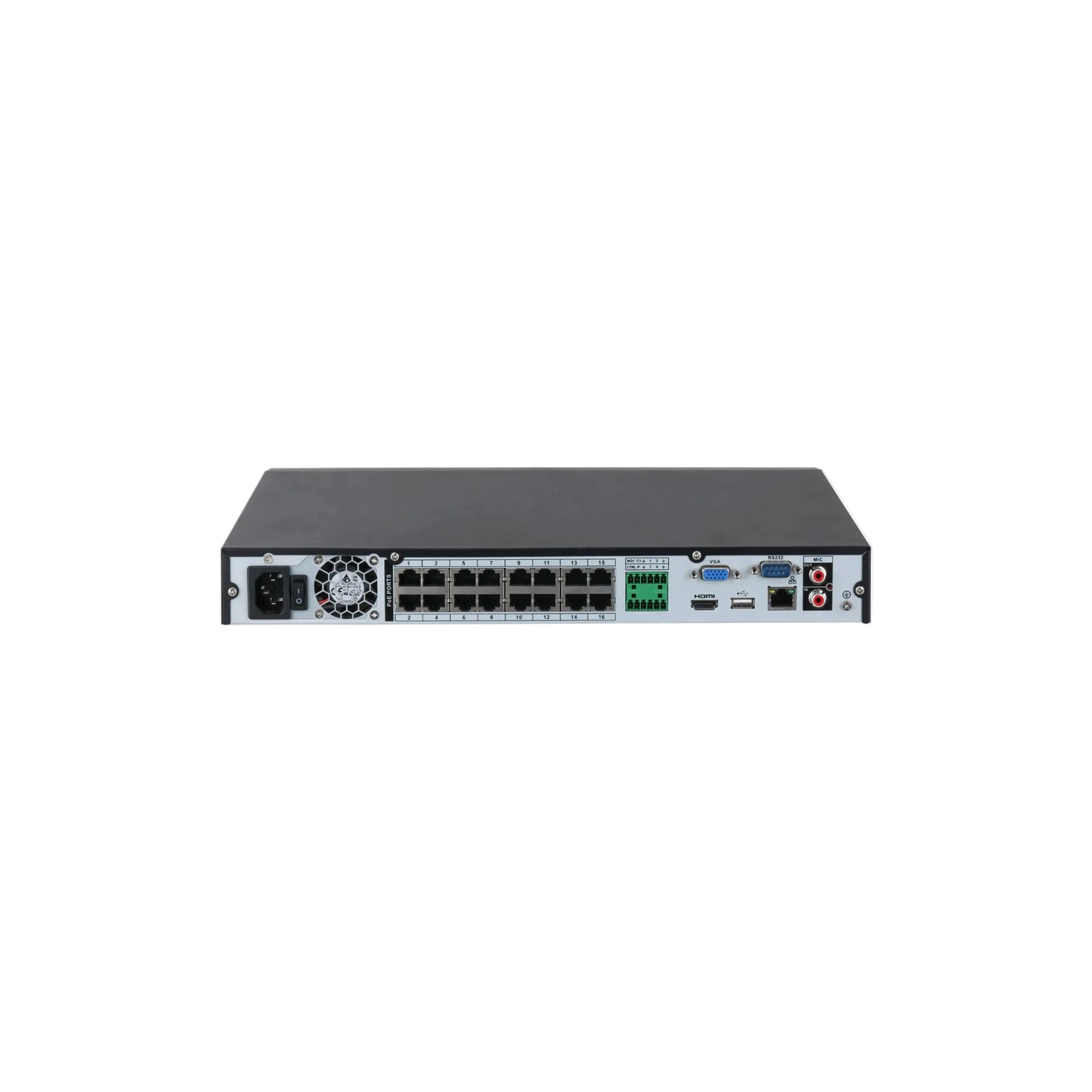
The Dahua NVR4216-16P-AI/ANZ is built for that scale. Sixteen built-in PoE ports mean every camera connects directly to the recorder over a single Cat6 run carrying both data and power — no separate switch to buy, mount, power or configure across sixteen positions. Two drive bays supporting up to 20 TB give genuine retention depth, which is where most sixteen-camera systems fall short.
It records resolutions from CIF to 16MP with 256 Mbps of bandwidth, outputs 4K over HDMI with a simultaneous VGA feed, and carries onboard AI — SMD Plus, perimeter protection and face recognition — for cameras that cannot do their own. Add four alarm inputs, two alarm outputs, RS-232, ONVIF and third-party camera support, and Dahua Security Baseline 2.3.
Two numbers decide whether this suits your site: the PoE power budget and how AI affects bandwidth. Both are covered honestly in the buyer tips — read them before you order, because they are the difference between a system that works and one that reboots.
Which Dahua NVR Do You Need?
We stock three Dahua network recorders. The channel count is the obvious difference; the drive bay count is the one that actually changes how the system behaves day to day.
| Model | Channels | PoE | Drive bays | Choose it when |
| NVR4108HS-8P-AI/ANZ | 8 | 8 ports | 1 | Homes and small business, a few weeks of retention |
| NVR4208-8P-AI/ANZ | 8 | 8 ports | 2 | Eight cameras but you need serious retention depth |
| NVR4216-16P-AI/ANZ | 16 | 16 ports | 2 | This page — larger sites, commercial premises, 9+ cameras |
The point people miss: moving from one drive bay to two matters more than the channel count on most sites. It roughly doubles your retention on the same camera set, and it lets you group disks so recording continues if one drive fails. If you have eight cameras but need thirty days of footage for insurance, the 8-channel two-bay model is a better buy than a bigger recorder with one bay.
Key Capabilities
Sixteen Built-In PoE Ports
Every channel has its own PoE port supporting IEEE 802.3af and 802.3at, so cameras connect directly to the recorder with one cable each. Across sixteen positions that saves a separate switch, its power, its rack space and its configuration — and Dahua cameras are detected automatically without manual IP addressing.
Two Drive Bays, Up to 20 TB
Two SATA bays supporting a combined 20 TB, with disk grouping so you can control how channels are distributed across drives. On a sixteen-camera system that capacity is not a luxury — it is what makes a meaningful retention period achievable at all.
Records Up to 16MP
Accepts everything from CIF through 1080p, 4MP, 6MP, 8MP and up to 16MP per channel, so the recorder will not be the thing limiting your camera choice — now or when you upgrade individual positions later.
256 Mbps Bandwidth
256 Mbps incoming, recording and outgoing — generous headroom for sixteen channels. Note this drops to 180 Mbps when NVR-side AI functions are enabled; see the buyer tips if you are planning high-resolution cameras across all sixteen positions.
SMD Plus and Perimeter Protection
Four channels of NVR-side SMD Plus classification filtering humans and vehicles from leaves, rain and lighting changes, plus two channels of perimeter protection with ten IVS rules each. Useful for adding intelligence to older cameras that have none — see the AI explainer below for how this interacts with AI cameras.
Face Recognition With Attributes
Up to ten face databases holding 20,000 images, with attribute detection covering gender, age group, glasses, expression, mask and beard. Note that facial recognition carries specific privacy obligations in Australia — see the buyer tips before enabling it commercially.
Dual Independent Displays
One HDMI at up to 3840 × 2160 and one VGA at up to 1080p, configurable as simultaneous or heterogeneous outputs — so the two screens can show different things. Useful in a control room or a shop where reception and the back office need different views.
Alarm I/O and RS-232
Four alarm inputs and two alarm outputs, plus RS-232 and audio in and out on RCA. That lets the recorder integrate with an existing alarm panel, drive external sirens or relays, and take inputs from beams and door contacts — genuine system integration rather than running in parallel.
Broad Third-Party Camera Support
ONVIF 23.12 with Profiles S, G and T, plus named support for Panasonic, Sony, Hanwha, Axis, Pelco, Arecont and Canon. On a commercial upgrade that breadth matters — existing cameras can often be brought across rather than replaced all at once.
Smart H.265+ and Smart Playback
Smart H.265+ compresses substantially harder than H.264, which across sixteen channels is the difference between weeks and months of retention. Playback modes include instant, general, event, tag and smart playback, so finding an incident does not mean scrubbing a timeline.
Industrial-Grade Hardware
An industrial-grade processor running embedded Linux, rated −10°C to +55°C at 10–93% humidity, in a 1U chassis at 375 × 329 × 53 mm. Under 10 W without drives, so the bulk of the power draw is the PoE and the disks rather than the recorder itself.
Security Baseline 2.3
Dahua Security Baseline 2.3 with HTTPS, IP filtering and the rest of the hardening feature set — which matters more than most buyers realise on an internet-connected device holding sixteen channels of footage.
AI by NVR vs AI by Camera
This is the most misread part of any AI recorder specification, and it decides whether the channel limits matter to you at all.
AI by Camera — all channels
If your cameras have onboard AI — every Dahua WizSense model does — the analysis happens at the camera before anything reaches the recorder. Dahua rates this as all channels, at 8 targets per second for perimeter and face, and 16 targets per second for SMD. No per-channel restriction applies. This is how most modern systems should be built.
AI by NVR — limited channels
If your cameras cannot analyse for themselves — older models, basic cameras, third-party units — the recorder does it instead. That processing is finite: 4 channels of SMD Plus, 2 channels of perimeter protection, 1 channel of face detection. Useful for adding intelligence to cameras that have none, but not a substitute for AI cameras across sixteen positions.
What this means in practice: pair this recorder with WizSense cameras and every one of the sixteen channels gets full AI classification, because each camera handles its own. Pair it with older cameras and the NVR can cover four of them. Most people buying a sixteen-channel recorder today are running WizSense cameras, in which case the limits never come into play — but it is worth understanding before you order rather than after.
Best For
Retail, warehouses, offices, workshops
Acreage, multi-building, 9+ positions
Common areas, car parks, lobbies, lifts
Two drive bays to 20TB
Broad third-party camera support
4 alarm inputs, 2 outputs, RS-232
Why Choose a 16-Channel Recorder
The honest answer is that most people buying sixteen channels are not covering sixteen positions today. They are covering ten or twelve and refusing to be in this situation again in two years.
That is a sound reason. Replacing a recorder is not just the cost of the unit — it is reconfiguring every camera, re-establishing remote access, losing the recorded history on the old drives unless you migrate them, and doing it all on a working system. Buying headroom once is far cheaper than buying the same thing twice, and sixteen channels with sixteen PoE ports gives most commercial sites somewhere to grow.
The two drive bays matter as much as the channels. Sixteen cameras generate a lot of data, and a single-bay recorder simply cannot hold a meaningful retention period at modern resolutions. Two bays supporting 20 TB combined is what makes thirty days achievable — which is the figure most insurers and compliance requirements land on.
And the integration is genuinely commercial-grade. Four alarm inputs and two outputs let the recorder work with an existing alarm panel rather than beside it. Dual independent displays suit a site where two people need different views. Broad third-party camera support means an upgrade does not have to replace everything at once.
Total Security Equipment stocks the Dahua range across our Melbourne and Sydney showrooms alongside compatible cameras, surveillance-rated drives, racks and accessories, with trade accounts for installers and phone support on system design. Send us your camera list and we will confirm the power budget and bandwidth before you order.
Buyer Decision Tips
Decoding Capability — What You Can Display at Once
Recording and decoding are different things, and this catches people out. The recorder records every channel at whatever resolution the camera sends. Decoding governs how many it can push to a screen simultaneously — and enabling NVR-side AI reduces it.
| Camera resolution | AI disabled | AI enabled |
| 16MP @ 30 fps | 2 channels | 1 channel |
| 12MP @ 30 fps | 2 channels | 2 channels |
| 8MP @ 30 fps | 4 channels | 3 channels |
| 6MP @ 30 fps | 4 channels | 3 channels |
| 5MP @ 30 fps | 6 channels | 4 channels |
| 4MP @ 30 fps | 8 channels | 6 channels |
| 1080p @ 30 fps | 16 channels | 12 channels |
| 720p @ 30 fps | — | 16 channels |
Your recorded evidence is unaffected by any of this — every channel records at full resolution regardless. The table only governs simultaneous on-screen display. For most sites a 16-way view at 1080p is exactly what you want anyway, with individual channels opened at full resolution when something needs reviewing.
Key Features & Technical Specifications
|
System |
|||||||||||||||||||||||||||||||||||||||||||||||||||||||||||
|
Main Processor |
Industrial-grade processor |
||||||||||||||||||||||||||||||||||||||||||||||||||||||||||
|
Operating System |
Embedded Linux |
||||||||||||||||||||||||||||||||||||||||||||||||||||||||||
|
Operating Interface |
Web, Local GUI |
||||||||||||||||||||||||||||||||||||||||||||||||||||||||||
|
AI |
|||||||||||||||||||||||||||||||||||||||||||||||||||||||||||
|
AI by Recorder |
Face detection; face recognition; perimeter protection; and SMD |
||||||||||||||||||||||||||||||||||||||||||||||||||||||||||
|
AI by Camera |
Face detection; face recognition; perimeter protection; SMD; ANPR; people counting; stereo analysis; heat map |
||||||||||||||||||||||||||||||||||||||||||||||||||||||||||
|
Perimeter Protection |
|||||||||||||||||||||||||||||||||||||||||||||||||||||||||||
|
Perimeter Performance AI by Recorder (Number of Channels) |
2 channels, 10 IVS rules for each channel |
||||||||||||||||||||||||||||||||||||||||||||||||||||||||||
|
Perimeter Performance of AI by Camera (Number of Channels) |
All channels (8 targets/s) |
||||||||||||||||||||||||||||||||||||||||||||||||||||||||||
|
Face Detection |
|||||||||||||||||||||||||||||||||||||||||||||||||||||||||||
|
Face Attributes |
Gender; age group; glasses; expressions; face mask; beard |
||||||||||||||||||||||||||||||||||||||||||||||||||||||||||
|
Face Detection Performance of AI by Recorder (Number of Channels) |
1 channel (up to 12 face images/s each channel) |
||||||||||||||||||||||||||||||||||||||||||||||||||||||||||
|
Face Detection Performance of AI by Camera (Number of Channels) |
All channels (8 targets/s) |
||||||||||||||||||||||||||||||||||||||||||||||||||||||||||
|
Face Recognition |
|||||||||||||||||||||||||||||||||||||||||||||||||||||||||||
|
Face Database Capacity |
Up to 10 face databases with 20,000 images, with a total capacity of 2.5 G. Name, gender, birthday, address, credential type, credential No., countries & regions and state can be added to each face image. |
||||||||||||||||||||||||||||||||||||||||||||||||||||||||||
|
Face Recognition Performance of AI by Recorder (Number of Channels) |
8-channel FD (by camera) + FR (by recorder),image stream: 12 face images/s |
||||||||||||||||||||||||||||||||||||||||||||||||||||||||||
|
Face Recognition Performance of AI by Camera (Number of Channels) |
All channels (8 targets/s) |
||||||||||||||||||||||||||||||||||||||||||||||||||||||||||
|
SMD Plus |
|||||||||||||||||||||||||||||||||||||||||||||||||||||||||||
|
SMD Plus by Recorder |
4 channels: Secondary filtering for human and motor vehicle, reducing false alarms caused by leaves, rain and lighting condition change |
||||||||||||||||||||||||||||||||||||||||||||||||||||||||||
|
SMD by Camera |
All channels (16 targets/s) |
||||||||||||||||||||||||||||||||||||||||||||||||||||||||||
|
Audio and Video |
|||||||||||||||||||||||||||||||||||||||||||||||||||||||||||
|
Access Channel |
16 channels |
||||||||||||||||||||||||||||||||||||||||||||||||||||||||||
|
Network Bandwidth |
AI disabled: 256 Mbps incoming, 256 Mbps recording and 256 Mbps outgoing |
||||||||||||||||||||||||||||||||||||||||||||||||||||||||||
|
Resolution |
16 MP;12 MP;8 MP;6 MP;5 MP;4 MP;3 MP;1080p;720p;960p;D1;CIF |
||||||||||||||||||||||||||||||||||||||||||||||||||||||||||
|
Decoding Capability |
AI disabled: 2-channel 16 MP@30 fps; 2-channel 12 MP@30 fps; 4-channel 8 MP@30 fps; 4-channel 6 MP@30 fps; 6-channel 5 MP@30 fps; 8-channel 4 MP@30 fps; 16-channel 1080p@30 fps |
||||||||||||||||||||||||||||||||||||||||||||||||||||||||||
|
Video Output |
1 HDMI, 1 VGA |
||||||||||||||||||||||||||||||||||||||||||||||||||||||||||
|
Multi-screen Display |
1st Screen: 1/4/8/9/16 |
||||||||||||||||||||||||||||||||||||||||||||||||||||||||||
|
Third-party Camera Access |
Panasonic, Sony, Hanwha, Axis, Pelco, Arecont, ONVIF, Canon |
||||||||||||||||||||||||||||||||||||||||||||||||||||||||||
|
Compression Standard |
|||||||||||||||||||||||||||||||||||||||||||||||||||||||||||
|
Video Compression |
Smart H.265+; H.265; Smart H.264+; H.264; MJPEG |
||||||||||||||||||||||||||||||||||||||||||||||||||||||||||
|
Audio Compression |
G.711a; G.711u; PCM; G726 |
||||||||||||||||||||||||||||||||||||||||||||||||||||||||||
|
Network |
|||||||||||||||||||||||||||||||||||||||||||||||||||||||||||
|
Network Protocol |
HTTP; HTTPS; TCP/IP; IPv4; IPv6; RTSP; UPnP; SNMP; UDP; SMTP; NTP; DHCP; DNS; IP Filter; PPPoE; DDNS; FTP; Alarm Server; IP Search (Support Dahua IP camera, DVR, NVS, etc.); P2P; Auto Registration |
||||||||||||||||||||||||||||||||||||||||||||||||||||||||||
|
Mobile Phone Access |
iOS; Android |
||||||||||||||||||||||||||||||||||||||||||||||||||||||||||
|
Interoperability |
ONVIF 23.12(Profile T; Profile S; Profile G); CGI; SDK |
||||||||||||||||||||||||||||||||||||||||||||||||||||||||||
|
Browser |
Chrome; IE9 and later; Firefox |
||||||||||||||||||||||||||||||||||||||||||||||||||||||||||
|
Recording Playback |
|||||||||||||||||||||||||||||||||||||||||||||||||||||||||||
|
Multi-channel Playback |
Up to 16 channels |
||||||||||||||||||||||||||||||||||||||||||||||||||||||||||
|
Record Mode |
General, motion detection; intelligent; alarm |
||||||||||||||||||||||||||||||||||||||||||||||||||||||||||
|
Backup Method |
USB device and network |
||||||||||||||||||||||||||||||||||||||||||||||||||||||||||
|
Playback Mode |
Instant playback, general playback, event playback, tag playback, smart playback |
||||||||||||||||||||||||||||||||||||||||||||||||||||||||||
|
Storage |
|||||||||||||||||||||||||||||||||||||||||||||||||||||||||||
|
Disk Group |
Yes |
||||||||||||||||||||||||||||||||||||||||||||||||||||||||||
|
Alarm |
|||||||||||||||||||||||||||||||||||||||||||||||||||||||||||
|
General Alarm |
Motion detection; privacy masking; video loss; scene changing; PIR alarm; IPC external alarm |
||||||||||||||||||||||||||||||||||||||||||||||||||||||||||
|
Anomaly Alarm |
Error (no disk; disk error; low space; low quota space; abnormal disk health; network disconnection; IP conflict; MAC conflict); video loss; video tampering; camera offline; audio detection |
||||||||||||||||||||||||||||||||||||||||||||||||||||||||||
|
Intelligent Alarm |
Face detection; face recognition; perimeter protection; SMD Plus; people counting; stereo analysis; heat map |
||||||||||||||||||||||||||||||||||||||||||||||||||||||||||
|
Alarm Linkage |
Record; snapshot; IPC external alarm output; audio; buzzer; log; preset; email |
||||||||||||||||||||||||||||||||||||||||||||||||||||||||||
|
Port |
|||||||||||||||||||||||||||||||||||||||||||||||||||||||||||
|
Audio Input |
1-channel RCA |
||||||||||||||||||||||||||||||||||||||||||||||||||||||||||
|
Audio Output |
1-channel RCA |
||||||||||||||||||||||||||||||||||||||||||||||||||||||||||
|
Alarm Input |
4 channels |
||||||||||||||||||||||||||||||||||||||||||||||||||||||||||
|
Alarm Output |
2 channels |
||||||||||||||||||||||||||||||||||||||||||||||||||||||||||
|
Disk Interface |
2 SATA ports, up to 20 TB.The maximum HDD capacity varies with environment temperature. |
||||||||||||||||||||||||||||||||||||||||||||||||||||||||||
|
RS-232 |
1 |
||||||||||||||||||||||||||||||||||||||||||||||||||||||||||
|
USB |
2 (1 front USB 2.0 port, 1 rear USB 2.0 port) |
||||||||||||||||||||||||||||||||||||||||||||||||||||||||||
|
HDMI |
1 |
||||||||||||||||||||||||||||||||||||||||||||||||||||||||||
|
VGA |
1 |
||||||||||||||||||||||||||||||||||||||||||||||||||||||||||
|
Network Port |
1 (10/100/1000 Mbps Ethernet port, RJ-45) |
||||||||||||||||||||||||||||||||||||||||||||||||||||||||||
|
PoE Port |
16 ports, 10/100 Mbps, IEEE 802.3 af/at |
||||||||||||||||||||||||||||||||||||||||||||||||||||||||||
|
General |
|||||||||||||||||||||||||||||||||||||||||||||||||||||||||||
|
Power Supply |
100–240 VAC, 47-63 Hz |
||||||||||||||||||||||||||||||||||||||||||||||||||||||||||
|
Power Consumption |
Total output of NVR is <10 W(without HDD) Total output power of PoE is 130W,the maximum output power of asingle port is 25.5W |
||||||||||||||||||||||||||||||||||||||||||||||||||||||||||
|
Net Weight |
2.60 kg (5.73 lb) |
||||||||||||||||||||||||||||||||||||||||||||||||||||||||||
|
Gross Weight |
3.80 kg (8.38 lb) |
||||||||||||||||||||||||||||||||||||||||||||||||||||||||||
|
Product Dimensions |
375.0 mm × 329.3 mm × 53.0 mm (14.76" × 12.96" × 2.09") (W × D × H) |
||||||||||||||||||||||||||||||||||||||||||||||||||||||||||
|
Packaging Dimensions |
451.0 mm × 425.0 mm × 147.0 mm (17.75" × 16.73" × 5.79") (W × L × H) |
||||||||||||||||||||||||||||||||||||||||||||||||||||||||||
|
Operating Temperature |
–10 °C to +55 °C (+14 °F to +131 °F) |
||||||||||||||||||||||||||||||||||||||||||||||||||||||||||
|
Storage Temperature |
–20 °C to +60 °C (–4 °F to +140 °F) |
||||||||||||||||||||||||||||||||||||||||||||||||||||||||||
|
Operating Humidity |
10%–93% (RH), non-condensing |
||||||||||||||||||||||||||||||||||||||||||||||||||||||||||
|
Certifications |
FCC: 47 CFR FCC Part15, SubpartB, Class A |
||||||||||||||||||||||||||||||||||||||||||||||||||||||||||
Ideal Use Cases
Retail and Hospitality
Entry, tills, floor, stockroom, rear door, loading, car park, office and staff areas add up quickly past eight channels. Dual independent displays let reception or the counter run one view while the office runs another, and the alarm I/O ties the recorder into an existing panel.
Warehouses and Industrial Sites
Loading docks, roller doors, yard perimeter, plant compounds and internal aisles typically need twelve to sixteen positions. Sixteen PoE ports means one cable per camera and no separate switch, and the two drive bays hold enough history for an insurance or WHS investigation.
Strata and Apartment Buildings
Lobbies, lifts, car park entries, bin areas, mail rooms, bike stores and boundary positions across a building comfortably reach sixteen. Broad third-party camera support also helps where a building has accumulated cameras from several installers over the years.
Acreage and Multi-Building Residential
A house, a shed, a workshop, a gate and a boundary is more positions than most people expect. Sixteen channels covers it with headroom, and the long retention from two drives matters on rural properties where an incident may not be noticed for days.
Systems That Have Already Outgrown One Recorder
This is the most common reason we sell sixteen-channel recorders, and it is worth naming. A site starts with eight channels, fills them within a year, adds a second eight-channel NVR to cover the rest — and now has two systems, two apps or two logins, two sets of retention, two places to look when something happens, and footage that cannot be reviewed on one timeline. It works, but it is genuinely worse than one recorder. Consolidating onto a single sixteen-channel unit costs less than most people assume, gives one continuous timeline across every camera, and removes the daily friction of a split system. If you are currently running two recorders, this is usually the upgrade worth making.
Choosing the Right Model
Choose this model if…
- You are running nine to sixteen cameras, or expect to within a year or two.
- You need long retention — two bays supporting 20 TB is the reason.
- You want built-in PoE across all sixteen positions with no separate switch.
- Your camera list fits inside the 130 W PoE budget.
- You have an alarm system and want the recorder wired into it.
- You are consolidating two smaller recorders onto one timeline.
- You need broad third-party camera support for a mixed site.
Choose a different model if…
- You are running eight cameras or fewer. The 8-channel Pro model gives you the same two drive bays for less.
- You only need a few weeks of retention on a small system. The 8-channel single-bay model is the economical choice.
- Your cameras are high-draw — strobes, sirens, heaters — and sixteen would exceed 130 W. Plan a separate PoE switch for some.
- You need NVR-side AI on more than four channels. Use cameras with onboard AI instead.
- Your cameras are analogue over existing coax. An XVR records those without rewiring.
- You need drive redundancy rather than capacity. Two bays give grouping, not RAID.
FAQs
Can it really power sixteen cameras?
It depends entirely on which cameras. The sixteen PoE ports share a 130 W total budget — around 8 W per camera if you use every port — with up to 25.5 W available on any single port. Standard fixed turrets drawing 6–10 W each fit comfortably. Cameras with strobes, sirens, speakers or heaters draw considerably more, and sixteen of those would exceed the budget. The symptom is cameras booting and rebooting rather than failing cleanly. Send us your camera list and we will add it up before you order.
The AI only supports 4 channels of SMD Plus — does that mean AI on a quarter of my cameras?
No, and this is the most common misreading. Those limits apply to AI by NVR — the recorder analysing on behalf of cameras that cannot. If your cameras have onboard AI, which every Dahua WizSense model does, they classify targets themselves and Dahua rates that as working across all sixteen channels. Build with WizSense cameras and the limits never apply; use the NVR-side AI to add intelligence to older cameras.
Why does bandwidth drop from 256 to 180 Mbps?
Because the processor is running AI analysis as well as recording, and that computation has to come from somewhere. Decoding capability drops with it — from four channels of 8MP to three, and from sixteen channels of 1080p to twelve. Letting the cameras handle their own AI avoids the reduction entirely, which is another reason to build with WizSense cameras where you can.
Does it come with hard drives?
No — it ships with two empty bays, so you will need at least one drive before it can record. Use surveillance-rated drives such as WD Purple or Seagate SkyHawk; standard desktop drives are designed for intermittent use and fail early under continuous surveillance writing, usually silently. On a sixteen-camera system we would generally recommend filling both bays. We stock surveillance drives and can supply the unit with them fitted.
Do two drive bays mean my footage is backed up?
Not automatically — the two bays give capacity and disk grouping rather than mirroring. What disk grouping does let you do is control which channels record to which drive, so you can put the critical cameras on one disk and general coverage on the other. If a drive then fails you lose half the system rather than all of it, and you choose which half. It costs nothing to configure and is well worth doing.
How long will sixteen cameras record for?
It depends on resolution, frame rate, compression and how much movement the cameras see. Sixteen cameras fill storage considerably faster than eight, and 8MP fills it faster than 4MP — Smart H.265+ helps significantly. If you need a specific retention period, such as the 30 days many insurers and compliance requirements specify, tell us the camera spec and we will size both drives properly rather than guessing.
Do I need a separate PoE switch?
Not for a standard sixteen-camera system — that is the main reason to choose this model. All sixteen ports are built in, so cameras plug directly into the recorder using one Cat5e or Cat6 cable each for both data and power, and Dahua cameras are detected automatically. You would only need an additional switch if your cameras are high-draw enough to exceed the 130 W total budget, in which case running a few from a separate switch solves it.
Can I display all sixteen cameras at once?
Yes — sixteen channels at 1080p with AI disabled, or twelve at 1080p and sixteen at 720p with NVR-side AI running. Both HDMI and VGA support 1, 4, 8, 9 or 16-way layouts and can be configured independently, so two screens can show different views. Your recorded evidence is unaffected: every channel records at full resolution regardless of what is on screen.
Will it work with non-Dahua cameras?
Yes, and the support is broader than most recorders — ONVIF 23.12 with Profiles S, G and T, plus named support for Panasonic, Sony, Hanwha, Axis, Pelco, Arecont and Canon. That is genuinely useful on a commercial upgrade where a site has accumulated cameras from several installers. Note that another manufacturer's intelligent features may not surface through this recorder; plan for recording and check anything beyond that with us.
What can I do with the alarm inputs and outputs?
Four inputs let external devices — beams, door contacts, an alarm panel output — trigger recording, snapshots or alerts on the recorder. Two outputs let the recorder drive an external siren, strobe or relay when an event occurs. On a commercial site with existing alarm infrastructure, wiring the two together turns two parallel systems into one integrated response. Plan the cabling during installation.
Should I use the face recognition?
Think carefully first. Facial recognition data is biometric information under the Australian Privacy Act, and using it in a commercial or public-facing setting brings notification, consent and data-handling obligations that ordinary CCTV does not — several Australian businesses have faced regulatory action over exactly this. For most sites, SMD Plus and perimeter protection deliver the practical benefit without the compliance burden. If you do want it, get advice on your obligations first.
Where can I buy it and what support is included?
Available from Total Security Equipment online and across both showrooms, with Australia-wide shipping. We stock compatible Dahua cameras, surveillance-rated drives, racks and accessories, and can supply the recorder with drives already fitted. Trade accounts and volume pricing are available for installers, and our team can check your PoE budget, bandwidth and drive sizing before you order.
Additional Information
Melbourne HQ
26 Davies Ave., Sunshine North, VIC 3020
03 9079 5566
Sydney Branch
38 Lisbon St., Fairfield East, NSW 2165
02 8722 0348
Ordering & Support
- Australia-wide shipping
- Ships without hard drives — surveillance drives in stock
- We can fit both drives before shipping on request
- Compatible Dahua cameras, racks and accessories available
- Trade accounts and volume pricing
- Phone support on PoE budgeting and drive sizing
- Download Spec Sheet
Not sure whether sixteen cameras will fit inside the 130 W PoE budget? Call our Melbourne team on 03 9079 5566 or Sydney on 02 8722 0348 — send us your camera list and we will add up the power and bandwidth before you order.