SKU:DS-2CD2386G2-I
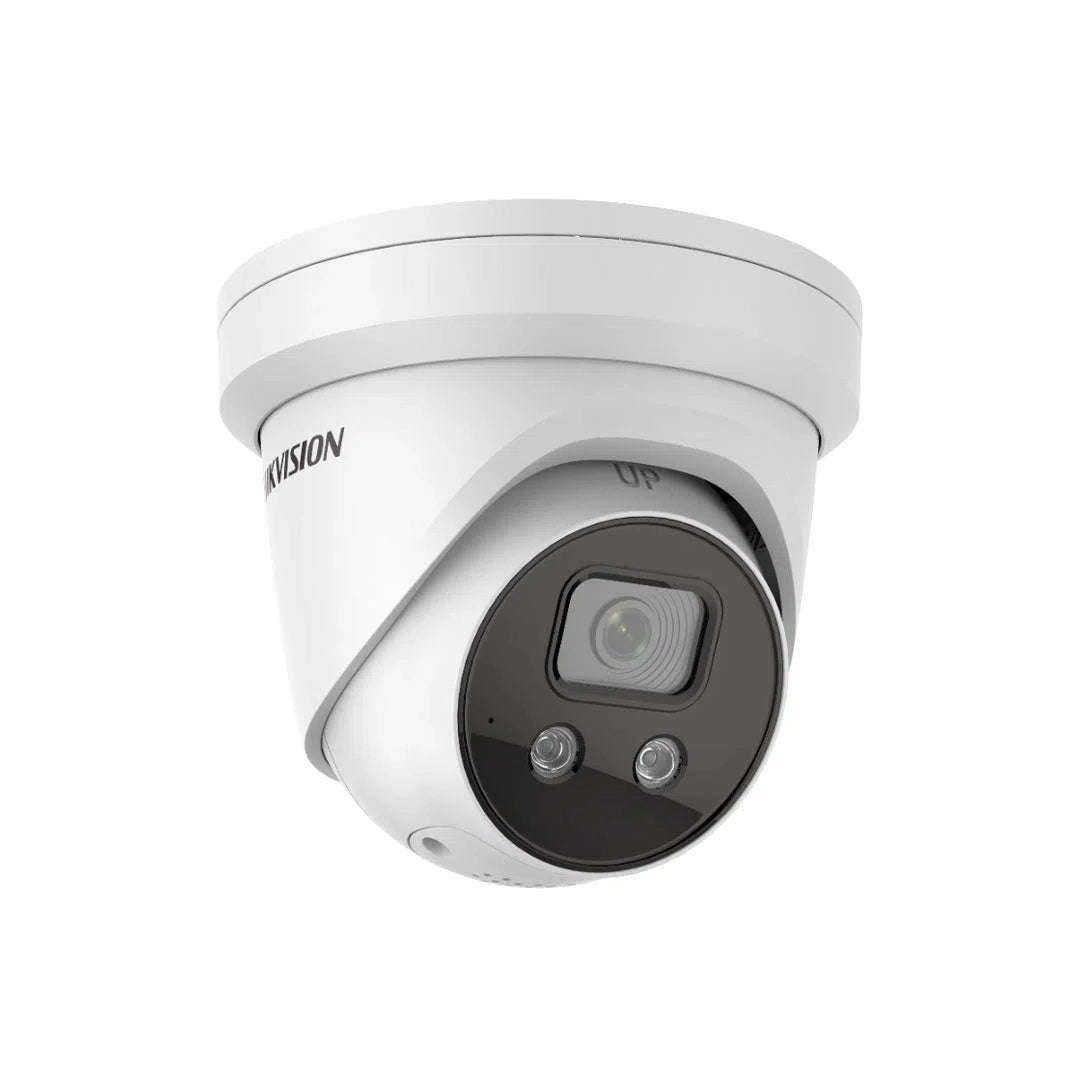
Hikvision 8MP DS-2CD2386G2-I AcuSense 2.8MM
Login to buyThis significantly reduces false alarms caused by animals, leaves, or other non-security events. With AcuSense, your security system becomes smarter and more efficient, allowing you to focus on real threats and take faster action.
Features:
8MP AcuSense Fixed Turret Network Camera With Built in Mic
High quality imaging with 8 MP resolution
Excellent low-light performance with powered-by-DarkFighter technology
Efficient H.265+ compression technology
Clear imaging against strong back light by 120 dB true WDR technology
Focus on human and vehicle targets classification based on deep learning
Built-in microphone for real-time audio security(-U)
Water and dust resistant (IP67)
-
Vendor:
HIKVision
- Tags: 4k, Acusense, New arrival, Offers
Buying from us? You get more than just the product.
Free Pre-Programming
We can pre-configure eligible products so they're ready to install.
Free 45 Mins Onsite Support
Stuck on the job? We'll come to you. Eligible purchases include up to 45 minutes of onsite support.
Project Management
From plans to handover. We assist with design, equipment selection, programming and commissioning.
End-User Support
We help support your customers too. Give your customers the confidence with reliable local support.

- Description
Product Overview
Reviewing security footage almost never means watching the whole frame. It means zooming into one corner of it — the number plate, the face, the thing someone was carrying — and finding out whether there is enough detail left to be useful.
That is what 8MP buys you. The Hikvision DS-2CD2386G2-IU records at 4K resolution, which gives roughly four times the pixel count of a 2MP camera and real headroom to crop hard into a recorded frame and still resolve something identifiable. On the positions where footage genuinely has to stand up — a front entrance, a counter, a driveway — that margin is the difference between a recording and evidence.
Around that sits the rest of Hikvision's G2 platform: powered-by-DarkFighter low-light processing, 120 dB true WDR for backlit entrances, AcuSense deep-learning human and vehicle classification to keep alerts credible, and a built-in microphone for audio alongside the video. H.265+ compression keeps the storage cost of 4K manageable, and IP67 sealing suits exposed outdoor mounting.
The turret housing sits close to the eave, aims easily once mounted, and is the sensible default for most residential and small commercial positions. Fitted with a 2.8 mm lens and powered over a single PoE cable run.
Which Hikvision G2 Camera Do You Need?
We stock five cameras built on this same imaging platform — same AcuSense classification, same DarkFighter low light, same 120 dB WDR. What differs is resolution, housing and extra features. This is the practical comparison.
| Model | Res. | Housing | Extra features | Choose it when |
| DS-2CD2386G2-IU | 8MP | Turret | Microphone | This page — maximum crop detail on a key position |
| DS-2CD2366G2-IU | 6MP | Turret | Microphone | Standard positions, or where low light matters most |
| DS-2CD2366G2-ISU/SL | 6MP | Turret | Strobe, speaker, alarm I/O | You want the camera to warn people off, not just record |
| DS-2CD2166G2-ISU | 6MP | Dome | IK10 vandal, alarm I/O | The camera is within reach and could be interfered with |
| DS-2CD2T66G2-4I | 6MP | Bullet | Long-range IR | You need night coverage well beyond a standard camera |
Mixing them across one property is normal and usually the right approach — 8MP on the front entrance where detail matters, a vandal dome on the reachable side wall, a long-IR bullet down the driveway. Because they share a platform, the picture is consistent across the system.
Key Capabilities
8MP 4K Resolution
Roughly four times the pixel count of a 2MP camera. The benefit shows up during review rather than live view — you can crop hard into a corner of a recorded frame and still have real image data rather than a block of pixels. That headroom is what turns a recording into evidence.
AcuSense Human and Vehicle Classification
Deep learning decides whether motion came from a person, a vehicle, or something you do not care about, before any alert is sent. Foliage, rain, pets and wildlife are filtered out. This is the feature that determines whether you are still reading notifications six months from now, or muted the app in week two.
Powered-by-DarkFighter Low Light
Hikvision's low-light imaging technology, which holds usable colour at light levels where a standard camera has already switched to greyscale. Colour is the first descriptor anyone asks for after an incident, so extending the window where it is available is worth real money on a site with any ambient light.
120 dB True WDR
True wide dynamic range balances exposure across bright and dark areas in the same frame — the feature that saves the shot of someone standing in a doorway with bright sky behind them. On entrances, glass-fronted premises and west-facing doors this is the difference between a usable face and a black outline.
Built-In Microphone
Records ambient audio alongside video, which frequently supplies the context a fixed camera angle leaves out — a verbal exchange at a counter or a door, an impact you would otherwise be guessing at. Note the legal considerations covered in the buyer tips before enabling it.
H.265+ Compression
Essential rather than optional at 4K, where storage costs scale quickly. H.265+ compresses substantially harder than H.264 for the same picture quality, which offsets a good part of the storage demand that 8MP creates across a multi-camera system.
Turret Housing
The sensible default for most positions. The ball-in-socket head repositions freely after the base is fixed, so you mount first and aim second — much easier on an eave than a fixed bullet. It also sits closer to the surface, attracts fewer spider webs than a bullet, and has no dome bubble to haze or reflect infrared.
IP67 Weatherproof
Fully dust-tight and sealed against water ingress, suited to exposed eave, soffit, fascia and wall positions including coastal salt air, tropical humidity and inland dust — the full range of Australian outdoor conditions.
Single-Cable PoE
Powered over a single Cat5e or Cat6 run carrying data and power together, with no plug pack sitting in the roof cavity waiting to fail. One cable per camera, one penetration, and no separate power run to each mounting point.
Best For
Maximum crop detail where it matters
4K detail plus audio at the till
Vehicle and clothing detail on approach
Turret aims easily after mounting
AcuSense removes the false alert problem
Doors, counters, gates within a few metres
Why Choose the 8MP Turret
The honest question is whether you need 8MP at all, because the 6MP version of this camera is otherwise identical and costs less. The answer depends on one thing: how much you are going to crop.
Choose 8MP for the positions that matter most. A front entrance, a counter, a driveway where vehicles arrive — anywhere the footage might need to identify a specific person or read something small. On those positions the extra pixel density means you can zoom into a recorded frame and still have something usable, and that is worth paying for.
Do not choose 8MP for everything. A camera watching a side fence or a back gate does not need 4K, and putting it there costs you twice — once in the camera, and again in storage, because 8MP fills a drive considerably faster than 6MP. A sensible system usually runs the highest resolution on two or three key positions and steps down elsewhere. That produces better outcomes than uniform 4K on a fixed budget.
Everything else about the camera is the same platform as the rest of the G2 range — AcuSense classification, DarkFighter low light, 120 dB WDR, IP67 turret housing, built-in microphone. That consistency is useful across a mixed system: the cameras behave the same way in the recorder, and the footage looks the same across positions.
Total Security Equipment supplies genuine Hikvision Australian stock from showrooms in Melbourne and Sydney, with compatible NVRs, brackets, junction boxes, storage and PoE gear on the shelf, trade accounts for installers, and local warranty handling.
Buyer Decision Tips
Key Features & Technical Specifications
| Model | DS-2CD2386G2-IU |
| Camera Type | 8MP AcuSense fixed turret with built-in microphone |
| Resolution | 8MP (4K) |
| Image Sensor | [CONFIRM SENSOR SIZE FROM DATASHEET] |
| Min. Illumination | [CONFIRM FROM DATASHEET] |
| Lens | 2.8 mm fixed |
| Low Light | Powered-by-DarkFighter technology |
| IR Range | [CONFIRM FROM DATASHEET] |
| Wide Dynamic Range | 120 dB true WDR |
| Analytics | AcuSense — human and vehicle classification via deep learning |
| Audio | Built-in microphone (-U) |
| Video Compression | H.265+ / H.265 / H.264+ / H.264 |
| Ingress Protection | IP67 — dust-tight and water resistant |
| Housing | Fixed turret |
| Power | PoE — [CONFIRM CLASS AND WATTAGE] |
Ideal Use Cases
Front Entrances and Front Doors
The position where identification matters most, and where the extra resolution is worth paying for. Anyone approaching the house passes close to the lens, so 8MP gives you genuinely usable facial detail after cropping. The built-in microphone also captures anything said at the door, which frequently adds context to a delivery dispute or an unwanted caller.
Retail Counters and Service Points
Counter positions generate the disputes that actually need resolving — a refund disagreement, a note handed over, an exchange that went wrong. 4K detail plus audio at close range gives you both sides of it, and 120 dB WDR handles the bright shopfront behind the customer.
Driveways and Carports
Vehicle colour, body type and clothing detail on the approach, with enough resolution to crop into a frame afterwards. AcuSense keeps the alert list credible on a street-facing property where unfiltered motion detection would fire at every passing car.
Standard Eave and Soffit Positions
The turret housing repositions inside its base after the base is fixed, so you mount to the eave and then aim — considerably easier than a bullet on a ladder. It also sits close to the surface, which keeps the installation tidy and attracts fewer spider webs than a bullet housing does.
The Two or Three Positions Worth Spending On
Most systems are specified the wrong way round. People pick one resolution and buy eight of them, which spreads the budget evenly across positions that are not equally important. A better approach is to identify the two or three places where footage would genuinely have to identify someone — usually the front entrance, the driveway and whichever door or counter has actually caused problems before — and put the highest resolution there. Everything else needs to show that something happened and roughly where, which a 6MP or even 4MP camera does perfectly well. Spent that way, the same budget produces a system that answers the questions you will actually be asking.
Choosing the Right Model
Choose this model if…
- This is one of the positions where footage would need to identify someone.
- You want maximum crop headroom for reviewing recorded frames.
- The position has reasonable light, or you are relying on the infrared.
- You want audio recorded at a doorway, counter or gate.
- Your recorder handles 8MP per channel and you have the drive capacity.
- It is a standard eave, soffit or wall position out of easy reach.
Choose a different model if…
- The position is poorly lit and low-light performance matters more than pixel count. Ask us to compare the 6MP figures before deciding.
- The camera is within reach and could be interfered with. The IK10 vandal dome is built for that.
- You need night coverage well beyond a standard camera. The long-IR bullet reaches further.
- You want the camera to warn people off. The ISU/SL turret adds a strobe and speaker.
- The position only needs to show that something happened. A lower resolution saves budget and storage for the positions that matter.
- You need colour footage right through the night. ColorVu runs a permanent white light.
FAQs
Is 8MP better than 6MP?
For daylight detail and crop headroom, yes — noticeably. For low light, not necessarily, and this surprises people. If a manufacturer fits more pixels onto the same size sensor, each individual pixel is smaller and gathers less light, so the higher-resolution model can perform worse after dark. It is worth checking the minimum illumination figures for both before choosing. For a well-lit entrance, choose 8MP. For a dark rear boundary, ask us to compare — the 6MP may serve you better.
Do I need 4K on every camera?
Almost certainly not, and spending that way usually produces a worse system. Put the highest resolution on the two or three positions where footage would genuinely have to identify someone — the front entrance, the driveway, the counter — and step down elsewhere. A camera watching a side fence needs to show that something happened, not who it was. Uniform 4K eats the budget and the storage without improving the shots that matter.
How much extra storage does 8MP use?
Substantially more than 6MP or 4MP — that is the practical cost of 4K, and it is the part people forget to budget for. H.265+ compression offsets a good deal of it by lowering the bitrate during static periods. If you have a retention target in mind, tell us your camera count, resolution and frame rate and we will size the drive properly rather than guessing.
Will my existing NVR handle it?
Check two things. First, maximum recording resolution per channel — a recorder capped at 4MP or 6MP will refuse or downscale the stream and waste the resolution you paid for. Second, total incoming bandwidth, because several 8MP cameras at full bitrate can exceed a modest budget and the symptom is dropped frames rather than an error. Send us your NVR model and we will confirm.
What does AcuSense do?
It uses deep learning to classify targets as human or vehicle on the camera itself, before an alert is sent. Foliage, rain, shadows, pets and wildlife are filtered out. Two benefits follow: your notifications stay credible enough that you keep reading them, and recorded footage becomes searchable by target type, so reviewing an overnight period takes minutes rather than hours.
What does the "IU" in the model number mean?
Hikvision uses letter suffixes to indicate features. "I" denotes infrared, and "U" denotes a built-in microphone — so an -IU model records audio as well as video. Elsewhere in the range, "S" indicates an audio and alarm interface with input and output terminals, and "SL" indicates a strobe light and audible warning. Knowing the suffixes makes it much easier to tell the models apart.
How good is the built-in microphone?
Useful at close range — a few metres rather than across a car park — and that range drops further with wind, traffic or general ambient noise. Position the camera so the area you want audio from sits close to the lens: a doorway, a counter, a gate. Treat anything beyond that as video only. It is a genuinely useful addition at the right position and largely irrelevant at the wrong one.
Is it legal to record audio in Australia?
Surveillance device laws are set at state and territory level and they differ meaningfully. As a general principle, recording private conversations without any party's knowledge is restricted. Entrances, external perimeters, yards and commercial premises with clear signage are usually the appropriate places to enable audio. Check the legislation applying in your state — in Victoria this is the Surveillance Devices Act 1999 — before switching the microphone on, and seek legal advice where the site is a workplace, shared or publicly accessible.
Should I choose a turret, bullet or dome?
Turrets are the sensible default for standard eave and wall positions — easy to aim after mounting, low profile, fewer spider webs than a bullet and no dome bubble to haze. Choose a bullet when you need long-range infrared or the camera is exposed to direct sun. Choose an IK10 vandal dome when the camera is within reach and could be interfered with. All our G2 cameras share the same imaging platform, so you are choosing a housing rather than compromising on picture quality.
Will it work on a non-Hikvision NVR?
Video recording will generally work over ONVIF. AcuSense classification and searchable analytic events depend on the recorder understanding Hikvision events, which in practice means a compatible Hikvision NVR. Since the AI is a good part of the reason to buy an AcuSense camera, pairing it accordingly is sensible — send us your recorder model and we will confirm before you order.
Where can I buy it and what support is included?
Available from Total Security Equipment online and across both showrooms, with Australia-wide shipping and compatible Hikvision NVRs, brackets, junction boxes, storage and PoE gear in stock. Trade accounts and volume pricing are available for installers, and our team can advise on which positions warrant 8MP, drive sizing and NVR compatibility before you order.
Additional Information
Melbourne HQ
26 Davies Ave., Sunshine North, VIC 3020
03 9079 5566
Sydney Branch
38 Lisbon St., Fairfield East, NSW 2165
02 8722 0348
Ordering & Support
- Australia-wide shipping
- Genuine Hikvision Australian stock
- Compatible NVRs, brackets and storage in stock
- Trade accounts and volume pricing
- Phone support on resolution planning and drive sizing
- Download Spec Sheet
Not sure which positions actually warrant 8MP? Call our Melbourne team on 03 9079 5566 or Sydney on 02 8722 0348 — describe the property and we will tell you where the resolution is worth paying for and where it is not.