SKU:TL-SG1016D
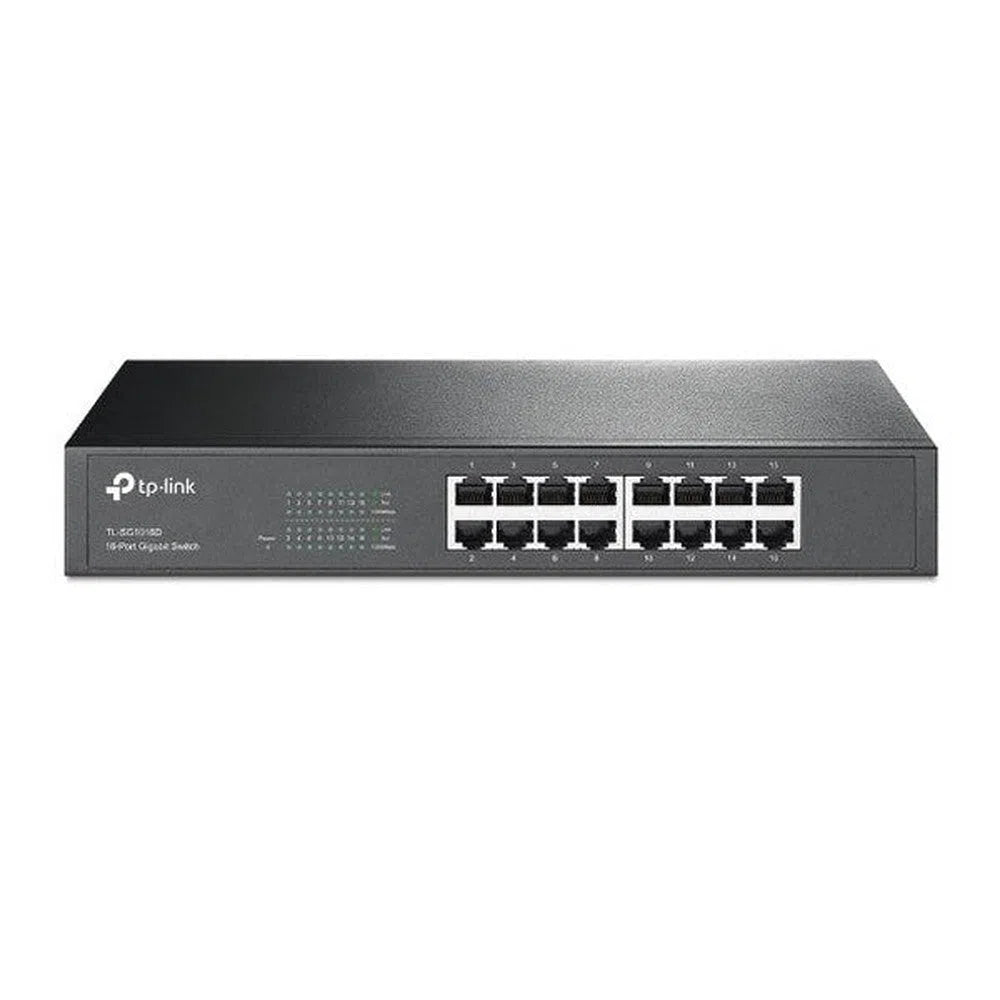
TP-Link 16-Port Gigabit Desktop/Rackmount Switch - TL-SG1016D
Login to buyFeatures
- 16 10/100/1000Mbps ports
- Innovative energy-efficient technology saves power consumption
- Supports MAC address self-learning, Auto MDI/MDIX and Auto negotiation
- Plug & play design
-
Vendor:
TP-Link
- Tags: Non-poe
Buying from us? You get more than just the product.
Free Pre-Programming
We can pre-configure eligible products so they're ready to install.
Free 45 Mins Onsite Support
Stuck on the job? We'll come to you. Eligible purchases include up to 45 minutes of onsite support.
Project Management
From plans to handover. We assist with design, equipment selection, programming and commissioning.
End-User Support
We help support your customers too. Give your customers the confidence with reliable local support.

- Description
Product Overview
The TP-Link TL-SG1016D is a 16-port unmanaged Gigabit switch built for straightforward network expansion — no configuration, no software, no PoE budget to plan around. Plug it in and it works, expanding a network by 16 Gigabit ports with auto-negotiation and Auto MDI/MDIX so any standard cable works in any port.
Its steel 13-inch chassis works equally well sitting on a shelf or mounted into a standard 19-inch rack, with rackmount brackets and rubber feet both included. A fanless design keeps it silent, and TP-Link's energy-efficient "Green Technology" automatically reduces power draw on shorter cable runs and idle ports. Supplied directly through Total Security Equipment.
Key Capabilities
16 Gigabit Ports
16 × 10/100/1000Mbps RJ45 ports with auto-negotiation and Auto MDI/MDIX.
Plug & Play, No Config
Fully unmanaged — no software, login or setup required. Connect it and it works.
Desktop or Rackmount
Steel 13-inch chassis suits a shelf or a standard 19-inch rack, with mounting brackets included.
Fanless & Energy-Efficient
Silent fanless operation, with Green Technology reducing power draw automatically.
Best For
Adds 16 extra Gigabit ports without any configuration required.
Ideal for PCs, printers, NVRs (with separately powered cameras) and other standard network gear.
Rackmount-ready when you need it, desktop-friendly when you don't.
Why Choose This Switch
Not every job needs a managed, cloud-connected switch — sometimes you just need more reliable Gigabit ports with zero setup. The TL-SG1016D is a straightforward, no-nonsense way to add 16 ports to a network, backed by TP-Link's long track record in unmanaged switching. Its steel chassis and fanless design make it a solid, quiet addition to any comms cabinet or equipment shelf. Available from Total Security Equipment.
Buyer Decision Tips
Key Features & Technical Specifications
| Model SKU | TL-SG1016D |
| Brand | TP-Link |
| Ports | 16 × 10/100/1000Mbps RJ45 Gigabit ports (no PoE) |
| Switching Capacity | 32Gbps |
| Forwarding Rate | 23.8 Mpps |
| MAC Address Table | 8K entries |
| Jumbo Frame Support | Up to 10KB |
| Management | Unmanaged — plug and play, no configuration or software required |
| Power Supply | Internal, 100–240VAC, 50/60Hz; ≈9.95W max consumption |
| Design | Fanless, steel 13-inch chassis, desktop or 19-inch rackmount |
| In the Box | Switch, rackmount brackets, rubber feet, power cable |
| Operating Temperature | 0°C to 40°C |
| Dimensions | ≈294mm × 180mm × 44mm |
| Weight | ≈1.9kg |
| Warranty | Commonly listed as 1 year by Australian resellers — confirm current warranty term with our team |
Ideal Use Cases
Office Network Expansion
Adds Gigabit ports for PCs, printers and other wired devices without configuration.
NVR & Recorder Networking
Connects an NVR and other non-PoE gear on the same network switch.
Home Networks
A simple, quiet way to add more wired connections around the house.
Comms Cabinet Installs
Rackmount-ready steel chassis fits neatly into an equipment cabinet.
FAQs
1. Does this switch supply PoE power to cameras?
No — this is a standard non-PoE switch. If you need to power IP cameras directly from the switch, ask our team about one of our PoE switch options instead.
2. Do I need to configure it before use?
No — it's fully unmanaged and plug-and-play. Just connect your cables and it works, with no software or login required.
3. Can this be rack mounted?
Yes — it ships with rackmount brackets included, alongside rubber feet if you'd rather sit it on a shelf or desk.
4. Is it noisy?
No — it's a fanless design, so it runs silently.
5. Where can I buy this switch in Australia?
It's available directly from Total Security Equipment.
Additional Information
Melbourne HQ
26 Davies Ave., Sunshine North, VIC 3020
03 9079 5566
Sydney Branch
38 Lisbon St., Fairfield East, NSW 2165
02 8722 0348
Ordering & Support
- Australia-wide shipping
- Trade accounts and volume pricing
- Phone support on network design & port planning
- Download Spec Sheet
Not sure if you need PoE ports, or how many ports your setup requires? Call our Melbourne team on 03 9079 5566 or Sydney on 02 8722 0348 — describe your setup and we will tell you honestly what fits.