SKU:XVR5108HS-4KL-I3
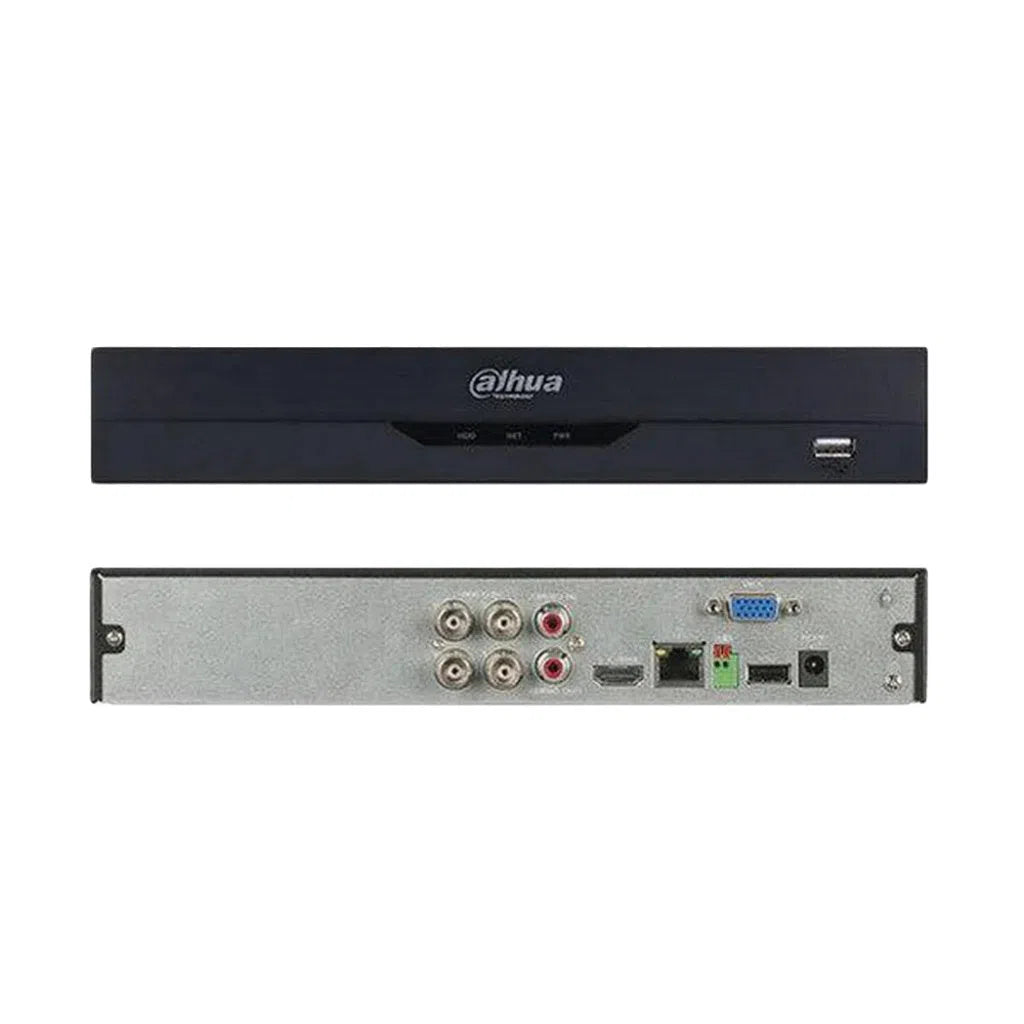
Dahua 8 Channel Compact 1U 1HDD WizSense Digital Video Recorder - XVR5108HS-4KL-I3
Login to buyDebuted its new XVR series, XVR5108-4KL-I3 featuring full-channel SMD Plus to benefit customers from AI upgrade. The series are designated to reduce false-alarm rates and human surveillance costs, thus bringing great value to customers in search of products with accurate human/vehicle alarm to raise the security level of various indoor and outdoor facilities.
Features
- H.265+/H.265 dual-stream video compression
- Supports HDCVI/AHD/TVI/CVBS/IP video inputs
- Max 16 channels IP camera inputs, each channel up to 8MP; Max 128 Mbps incoming bandwidth
- Up to 2 channels video stream ( analog channel ) Perimeter Protection
- Up to 8 channels video stream ( analog channel ) SMD Plus
- Up to 2 channels video stream (analog channel ) human face recognition
- IoT & POS functionalities
-
Vendor:
Dahua
- Description
Product Overview
If your property already has CCTV cabling in the walls, the expensive part of upgrading is not the cameras. It is the rewiring — pulling new Cat6 through roof cavities, down wall cavities and around a building that was never designed to have cable run through it. On an existing site that work often costs more than the equipment.
The Dahua XVR5108HS-4KL-I3 exists so you do not have to do it. An XVR is a hybrid recorder: it records modern high-definition cameras over the coax cable you already have, and IP cameras over the network at the same time. Replace the cameras, replace the recorder, keep the cabling.
What makes this generation worth having is that the intelligence came along too. Full-channel SMD Plus means human and vehicle classification across all eight analogue channels — so an old coax system gets modern, credible alerts rather than the constant false triggers that made everyone stop reading their notifications. It also supports two channels of perimeter protection, two channels of face recognition, H.265+ compression and IoT and POS integration.
One important difference from an NVR: this recorder has no built-in PoE ports. Analogue cameras need their own power supply, and IP cameras need a separate PoE switch. That is normal for a hybrid recorder, but it is worth knowing before you order — the buyer tips explain what you will need.
XVR, DVR or NVR — What's the Difference?
Three acronyms, one letter apart, and they determine what cable you need. This is the most useful thing to understand before choosing a recorder.
DVR — coax only
Records analogue cameras over coaxial cable. The older technology, still perfectly serviceable, but it cannot accept IP cameras at all. If you have one of these and want to add a network camera, you need to change the recorder.
NVR — network cable only
Records IP cameras over Cat5e or Cat6, usually with PoE built in so one cable carries data and power. Excellent on a new install where you are running cable anyway — but it cannot use existing coax, so an upgrade means rewiring the whole property.
XVR — both, at the same time
Records high-definition cameras over existing coax and IP cameras over the network, simultaneously. This is what lets you upgrade an old system without rewiring, and add network cameras later on the positions where new cable is easy to run.
The practical decision: if you are wiring a property from scratch, buy an NVR and run Cat6 — it is the better long-term platform and the PoE makes installation simpler. If the property already has coax in the walls and you want modern cameras without tearing the place apart, an XVR is the right answer and will save you considerably more than the price difference between the two recorders.
Key Capabilities
Records Over Existing Coax
Supports HDCVI, AHD, TVI and CVBS inputs, which covers essentially every analogue camera format in circulation. That means the cable already running through your walls stays where it is — you change the cameras and the recorder, and skip the rewiring entirely.
Full-Channel SMD Plus
Human and vehicle classification across all eight analogue channels. This is the feature that matters most on an upgrade — it is what turns an old system that alerted on every possum and every branch into one that only tells you when a person or vehicle is actually there. AI over coax, with no new cable.
IP Camera Support Up to 8MP
Alongside the analogue channels, the recorder accepts IP cameras at up to 8MP each with 128 Mbps of incoming bandwidth. So you can keep the existing coax positions running and add network cameras on the spots where pulling new cable is straightforward — a staged upgrade rather than an all-at-once rebuild.
Perimeter Protection
Two channels of tripwire and intrusion detection with human and vehicle classification. Draw a line across a gate or a zone around a yard and be alerted only when a classified target crosses it — available on analogue channels, which is unusual and genuinely useful on an older system.
Face Recognition
Two channels of human face recognition for applications such as staff or resident identification at an entry point. Note that facial recognition carries specific privacy obligations in Australia — see the buyer tips before enabling it in a commercial or public-facing setting.
H.265+ Compression
H.265+ and H.265 dual-stream compression, which compresses substantially harder than the H.264 used by older recorders. On an upgrade this often means noticeably longer retention on the same size drive than the system you are replacing achieved.
IoT and POS Integration
POS integration overlays point-of-sale transaction data onto the video, so a till transaction can be matched directly to the footage of it happening. For retail and hospitality this is one of the genuinely useful commercial features and it is rare at this price point.
Compact 1U, Single Drive Bay
A small chassis sized to sit in a comms cabinet, on a shelf or in a lockable cupboard — often in exactly the spot the old DVR came out of. One internal drive bay, and the unit ships bare so you choose capacity to match the retention you need.
Straightforward Replacement
On a coax upgrade this generally drops into the position the old recorder occupied, using the same BNC connections. The cameras change, the recorder changes, the cabling and the mounting points stay. That is what makes an XVR upgrade a morning's work rather than a multi-day job.
Best For
Keep the coax, replace everything else
Solid walls, heritage, no roof access
SMD Plus over existing coax
Coax now, IP cameras added later
POS overlay ties tills to footage
Upgrade without altering the building
Why Choose an XVR
The argument for this recorder is almost entirely economic, and it is a strong one.
Rewiring is the expensive part of a CCTV upgrade. Cameras and recorders are a known cost. Running new cable through an occupied building is not — it involves roof access, wall cavities, making good, and on a difficult property it can easily exceed the price of the equipment. On a heritage building, a rendered brick house, a tenanted commercial space or anywhere with no accessible roof void, it can be close to impossible.
An XVR removes that cost entirely. The coax already running to your existing cameras carries modern high-definition video. You swap the cameras, swap the recorder, and the cable stays exactly where it is. For most upgrades that turns a multi-day job into a morning.
And this generation brings the AI with it, which is what makes the upgrade worth doing at all. Full-channel SMD Plus means human and vehicle classification on every analogue channel. The single biggest complaint about older systems is not picture quality — it is that the motion alerts became so unreliable that nobody reads them any more. Fixing that, over cable you already own, is the strongest reason to choose this recorder.
If you are wiring a property from scratch, we would recommend an NVR and Cat6 instead — it is the better long-term platform and the built-in PoE simplifies installation considerably. The XVR is specifically the right answer when the cable is already in the walls.
Total Security Equipment stocks the Dahua range across our Melbourne and Sydney showrooms with compatible cameras, surveillance drives, power supplies and accessories, trade accounts for installers, and phone support on upgrade planning.
Buyer Decision Tips
Key Features & Technical Specifications
| Model | XVR5108HS-4KL-I3 |
| Recorder Type | 8 channel WizSense XVR (hybrid analogue and IP) |
| Analogue Inputs | HDCVI / AHD / TVI / CVBS |
| IP Camera Inputs | Up to 16 channels, each up to 8MP |
| Incoming Bandwidth | Max. 128 Mbps |
| SMD Plus | Up to 8 channels (analogue) |
| Perimeter Protection | Up to 2 channels (analogue) |
| Face Recognition | Up to 2 channels (analogue) |
| Video Compression | H.265+ / H.265 dual-stream |
| Additional Features | IoT and POS functionality |
| Drive Bays | 1 × SATA — [CONFIRM MAX CAPACITY] |
| Hard Drive | Not included — surveillance-rated drive required |
| PoE Ports | None — see Buyer Tip on power |
| Form Factor | Compact 1U chassis |
| Mobile App | DMSS |
Ideal Use Cases
Replacing an Ageing DVR System
The clearest case. A system installed eight or ten years ago still has perfectly good cable in the walls, but the picture is dated and the motion alerts are useless. Swap the cameras and the recorder over the existing coax and you get high-definition footage and working AI classification without opening a single wall.
Buildings That Are Difficult to Rewire
Double brick, rendered walls, heritage buildings, concrete construction, properties with no accessible roof void. On these sites running new cable is genuinely difficult and sometimes not permitted at all — and using the cable that is already there stops being a cost saving and becomes the only practical option.
Retail and Hospitality With POS
POS integration overlays till transaction data directly onto the video, so a specific transaction can be matched to the footage of it happening. For investigating discrepancies, refund disputes or shrinkage at the counter, that link between data and vision is considerably more useful than either on its own.
Staged Upgrades on a Budget
Because it handles both cable types, you can move at whatever pace suits. Keep the existing coax cameras running now, replace them progressively, and add IP cameras on the positions where new cable is easy. The recorder stays the same throughout rather than needing replacement halfway through the transition.
Rented and Leased Premises
This case comes up more often than people expect and rarely gets discussed. If you lease your premises, running new cable usually means asking the landlord's permission, making good at the end of the lease, and leaving behind infrastructure you paid for. Using cable that is already installed avoids all of it — no alterations to the building, no permission needed, no make-good obligation, and the cameras and recorder come with you when you move. For a tenant business wanting a proper security system without investing in someone else's building, an XVR upgrade is often the only sensible route.
Choosing the Right Model
Choose this model if…
- Your property already has coax cabling to existing camera positions.
- Rewiring would be expensive, disruptive or not permitted.
- You want AI human and vehicle classification on an older system.
- You want to upgrade progressively rather than all at once.
- You need POS integration for a retail or hospitality site.
- You are in leased premises and would rather not alter the building.
Choose a different model if…
- You are wiring a property from scratch. An NVR with Cat6 is the better long-term platform and the built-in PoE simplifies the install considerably.
- You want built-in PoE. This has none — cameras need separate power or a separate switch.
- Your existing coax is in poor condition. Bad cable will limit what any recorder can achieve — check first.
- You are running all IP cameras. A dedicated NVR does that job better.
- You need more than eight channels, or expect to within a year.
- You need months of retention or drive redundancy. This has one bay.
FAQs
What is the difference between an XVR, a DVR and an NVR?
A DVR records analogue cameras over coax only. An NVR records IP cameras over network cable only, usually with PoE built in. An XVR does both simultaneously, which is what lets you upgrade an existing coax system to high definition without rewiring, and add IP cameras later. If you are cabling a property from scratch, buy an NVR. If the cable is already in the walls, an XVR is the answer.
Can I really keep my old cable?
In most cases yes, and it is the entire reason to buy this recorder. The coax running to your existing analogue cameras will carry modern high-definition video. What matters is the condition of that cable — sound RG59 or RG6, terminated properly, without dubious joins in the roof. Very long or poor-quality runs can limit what you achieve. If you are unsure, test one position first or send us photos of the cable and connections.
Does it have PoE like an NVR?
No, and this is the most important practical difference to understand. An XVR does not power your cameras. Analogue cameras need their own 12 V power supply at each position or from a central distribution box — which is usually already in place on an existing system. Any IP cameras you add need a separate PoE switch. Neither is difficult, but both need budgeting for, and neither is included.
Will my existing analogue cameras work with it?
It supports HDCVI, AHD, TVI and CVBS, which covers essentially every analogue format in circulation, so most existing cameras will record. What they will not deliver is the picture quality or the AI features — an old standard-definition camera on a new recorder is still an old standard-definition camera. The upgrade that actually changes things is new HD cameras on the existing cable, and that is where the SMD Plus classification comes from too.
Can it really do AI on analogue cameras?
Yes — full-channel SMD Plus across all eight analogue channels, plus two channels of perimeter protection and two of face recognition. This is the genuinely notable part of this recorder. Human and vehicle classification over coax means an older system can get modern, credible alerts without any new cable. Pair it with compatible Dahua HDCVI cameras to get the full benefit.
Can I mix analogue and IP cameras?
Yes, and that is one of the main advantages. Keep the existing coax positions running while adding IP cameras on the spots where new cable is straightforward — a side gate near the switchboard, a garage with an easy route. It lets you upgrade progressively instead of doing everything at once. Tell us your coax count and planned IP cameras and we will confirm the configuration works.
Does it come with a hard drive?
No. It ships with an empty bay, so you will need a drive before it can record. Use a surveillance-rated drive such as WD Purple or Seagate SkyHawk. If you are replacing an old DVR, do not reuse its drive — it has already done years of continuous writing and is closer to failure than you would like. We stock surveillance drives and can supply the recorder with one fitted.
What does the POS integration actually do?
It overlays point-of-sale transaction data onto the recorded video, so a specific till transaction can be matched directly to the footage of it happening. For investigating refund discrepancies, voided sales or counter shrinkage, being able to search the transaction and go straight to the vision is considerably more useful than reviewing either separately. Setup depends on your POS system, so check with us about compatibility.
Should I use the face recognition?
Think carefully first. Facial recognition data is biometric information under the Australian Privacy Act, and using it in a commercial or public-facing setting brings notification, consent and data-handling obligations that ordinary CCTV does not — several Australian businesses have faced regulatory action over exactly this. For most upgrades, SMD Plus and perimeter protection deliver the practical benefit without the compliance burden.
How long will footage be kept before it overwrites?
It depends on camera count, resolution, frame rate and how much movement the cameras see. H.265+ compression helps considerably — on an upgrade you will often get noticeably longer retention on the same drive size than the old system managed. If you need a specific retention period, such as the 30 days many insurers ask for, tell us the camera spec and we will size the drive properly.
Where can I buy it and what support is included?
Available from Total Security Equipment online and across both showrooms, with Australia-wide shipping. We stock compatible Dahua HDCVI and IP cameras, surveillance drives, power supplies and accessories, and can supply the recorder with a drive already fitted. Trade accounts and volume pricing are available for installers, and our team can help plan a coax upgrade before you commit to it.
Additional Information
Melbourne HQ
26 Davies Ave., Sunshine North, VIC 3020
03 9079 5566
Sydney Branch
38 Lisbon St., Fairfield East, NSW 2165
02 8722 0348
Ordering & Support
- Australia-wide shipping
- Ships without a hard drive — surveillance drives in stock
- We can fit the drive before shipping on request
- Compatible HDCVI and IP cameras, power supplies available
- Trade accounts and volume pricing
- Phone support on planning a coax upgrade
- Download Spec Sheet
Thinking about upgrading an old coax system? Call our Melbourne team on 03 9079 5566 or Sydney on 02 8722 0348 — tell us what you have now and we will tell you whether the existing cable will do the job before you spend anything.